

An ear monitor system is a game-changer for any live performance. It’s a professional audio setup that sends a custom sound mix directly into a performer's ears, completely replacing the loud, clunky floor speakers many of us are used to. This technology, known in the industry as an in-ear monitor (IEM) system, gives musicians, speakers, and singers crystal-clear sound and puts them in complete control of what they hear on stage. Ready to transform your performance? Let's dive in.
From Stage Chaos to Crystal-Clear Control

You know the scene. The stage is a battlefield of volume. Floor wedges are blasting sound everywhere, the singer is waving her hands trying to get "more me," and the drummer is hitting harder just so he can feel the beat. This isn't just messy—it leads to shaky performances and a muddy sound for your audience.
An ear monitor system fixes this entire problem. Think of it as giving every single person on stage their own private, direct line to the soundboard. No more one-size-fits-all monitor mix. Everyone gets exactly what they need, delivered right to their ears.
Practical Example: A Worship Band Transformed
Imagine a church worship band struggling with their stage sound week after week. The lead vocalist can’t hear herself, but turning her up in the wedge causes ear-splitting feedback. The keyboard player is set up next to the drummer and feels like he's just guessing at the notes.
Switching to an ear monitor system changes everything. Instantly.
- The Vocalist: She finally hears a pristine mix of her own voice, perfectly balanced with the rest of the band. Her pitch locks in, and she sings with confidence instead of straining. She gets her own personal mix.
- The Keyboardist: He can actually hear his keys, completely isolated from the cymbal wash right next to him. He can even ask the sound tech to turn up the backing tracks just for him, without affecting anyone else's mix.
- The Drummer: He gets a punchy, tight mix with plenty of bass guitar and a click track to lock in the rhythm, all without having to play over everyone else. This is a game-changer for tight performances.
The result is a dramatically quieter stage. This is huge, because it gives your front-of-house engineer the control they need to create a clean, powerful, and dynamic mix for the congregation. It’s not a small tweak; it’s a fundamental upgrade to how your team performs and sounds.
Floor Wedges vs Ear Monitor Systems
The move away from traditional wedges is one of the biggest leaps forward in live sound. Here’s a quick breakdown of why so many bands and churches are making the switch.
| Feature | Floor Wedges | Ear Monitor System (IEM) |
|---|---|---|
| Stage Volume | High, contributes to volume wars and muddy sound | Very low, creates a clean and controlled stage |
| Mix Consistency | Mix changes as the performer moves around | Consistent mix, regardless of movement |
| Feedback Risk | High, especially with sensitive vocal mics | Virtually zero risk of feedback |
| Hearing Protection | No protection; can contribute to hearing damage | Provides significant hearing protection by isolating sound |
| Mix Customization | Limited, one mix often shared by multiple performers | Fully customizable mix for every individual on stage |
| Portability | Heavy and bulky, difficult to transport | Lightweight and compact, easy to take anywhere |
As you can see, the benefits go far beyond just "hearing better." An IEM system protects your team's hearing, cleans up your front-of-house mix, and leads to more confident, professional performances.
The Growing Demand for Better Audio
This technology’s impact is why the global in-ear monitoring system market was valued at USD 1.5 billion in 2024 and is projected to explode to USD 2.8 billion by 2033. This isn't a fad. The demand is driven by artists, engineers, and venues who understand that precise, high-quality audio is non-negotiable for live events. Explore the full report on the in-ear monitoring market to see the data for yourself.
For any performing group, the benefits are undeniable. Better sound quality, hearing protection, and a more professional stage environment make an ear monitor system an essential investment. At John Soto Music, we specialize in helping churches, bands, and venues find the right monitoring solution. We'll help you navigate the options and take the first step toward flawless stage sound.
The Core Components of Your IEM System
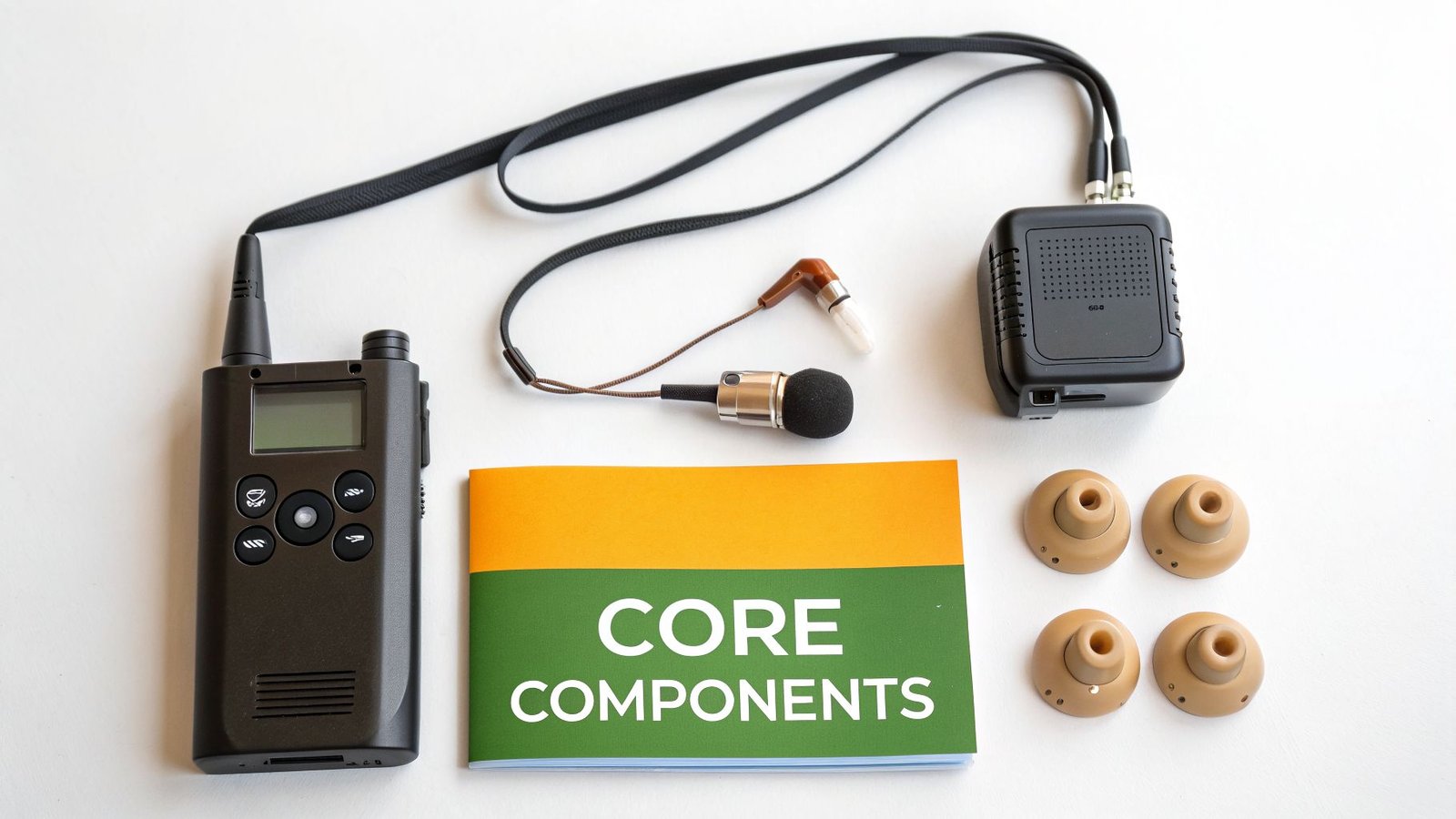
At its core, an ear monitor system is surprisingly straightforward. Think of it as a tiny, personal radio station built just for one performer. It’s all about getting the right sound to the right person, and it only takes three pieces of gear working together to make it happen.
Once you understand what these three parts do, the whole concept just clicks. It doesn't matter if you're buying a complete kit or building your own rig piece by piece; every wireless IEM setup relies on these non-negotiable components to deliver a crystal-clear mix from the soundboard directly into a musician's ears.
1. The Transmitter: Your Broadcast Hub
The transmitter is the brain of the operation. This is the unit that takes a specific monitor mix from your soundboard—what we often call an "aux mix"—and turns it into a radio signal it can broadcast across the stage.
Most transmitters are half-rack units, so they fit neatly into a road case for touring or can just sit on a table next to the mixer. You connect them with a standard XLR or 1/4" cable, pick a clean radio frequency, and you're on the air.
Practical Example: Your lead singer needs to hear more of her own voice and a lot less of the drums. The sound tech creates this custom mix on the console and sends it out of "Aux 1." That output plugs right into a transmitter, which then broadcasts only that vocal-heavy mix on its dedicated channel. This is the key to personal monitoring.
2. The Bodypack Receiver: The Musician's Personal Radio
This is the small box that each performer wears, usually clipped to a belt, a back pocket, or a guitar strap. Its one job is to tune into the specific frequency being sent by its paired transmitter and catch that audio signal. It’s a pocket-sized radio receiver, plain and simple.
The bodypack is what gives performers the freedom to move anywhere on stage. As long as they're within the transmitter's range—which is typically up to 300 feet for professional systems—they get a consistent, high-quality feed. It has a volume knob so they can make small adjustments themselves and a headphone jack where their in-ears plug in.
3. The In-Ears: The Last and Most Crucial Link
Finally, you have the in-ears themselves. These are highly specialized earphones that take the sound from the bodypack and deliver it right to the performer. Don't mistake these for the earbuds that came with your phone—they are engineered for two critical jobs on stage:
- Sound Isolation: They create a seal in the ear canal, physically blocking out the roar of stage amps, drums, and the main PA speakers. This is the magic that lets performers hear their mix perfectly at a much lower, safer volume.
- Audio Fidelity: Pro-grade in-ears use high-quality drivers to reproduce sound with incredible detail. From the deepest bass notes to the shimmer of a cymbal, everything comes through with stunning clarity.
Putting It All Together: The Signal Path
So, how does the sound actually get from the mixer to the musician? The signal path is a straight shot, and knowing the route is the key to both setup and troubleshooting.
- Mixer: The sound engineer creates a custom monitor mix for a performer (let's call it "Sarah's Mix").
- Transmitter: That mix is sent from an aux output on the board to the transmitter through an XLR cable. The transmitter then broadcasts "Sarah's Mix" on a specific radio frequency.
- Bodypack Receiver: Sarah's bodypack, clipped to her jeans, is tuned to that same frequency and picks up the wireless signal.
- In-Ears: She plugs her in-ears into the receiver and hears her perfect, isolated mix, no matter where she walks on stage.
This simple, three-part system is the foundation of all modern stage monitoring. At John Soto Music, we offer complete, ready-to-go systems like the Shure PSM300 or Sennheiser XSW IEM that bundle these components together, making it incredibly easy to get started. Understanding how they all work together gives you the confidence to operate, expand, and get the most out of your ear monitor system.
Wired vs Wireless Ear Monitor Systems
Choosing between wired and wireless ear monitors is one of the first big decisions you'll make when building out your stage setup. This isn't just about getting rid of cables—it's a practical choice that directly impacts your budget, reliability, and how your performers can interact with the space.
The good news is, the choice is usually pretty straightforward. It almost always comes down to a single question: does the person using them need to move? Your answer will point you to the right gear nearly every time.
Wired IEMs: Rock-Solid Reliability
Wired IEMs are the workhorses of the stage. For any musician who stays in one spot—think drummers, keyboard players, or choir members—a wired system is the perfect fit. They are loved for two simple reasons: they are completely dependable and incredibly affordable.
The setup couldn't be easier. A cable runs from a small headphone amplifier or a personal mixer straight to the musician's ears. This direct, physical connection gives you two huge advantages:
- Absolutely Bulletproof Audio: With no radio signals involved, the sound is flawless. You never have to think about static, signal dropouts, or interference from other wireless gear. The mix you send is the mix they get, period.
- Incredible Value: Wired systems cost a fraction of their wireless counterparts. You can often get your entire rhythm section set up for less than the price of a single pro-grade wireless unit, making this a no-brainer for churches and bands on a tight budget.
Practical Example: Imagine a church drummer who can't hear the click track over the stage volume. For less than $50, you can get a simple belt-pack amp like the Behringer P2, run a cable from a mixer's aux send, and give that drummer a crystal-clear, personal mix. It's a cheap, simple, and completely reliable fix that elevates the entire band's performance.
The Freedom of Going Wireless
For anyone who moves on stage, wireless is the only way to go. Lead singers, dynamic guitar players, pastors, and speakers all need the freedom to engage the audience without being tethered to one spot.
Wireless systems, like the industry-standard Shure PSM300 or the popular Sennheiser XSW IEM, work by broadcasting the monitor mix over radio frequencies. While this gives you amazing freedom, it does introduce the risk of interference. Thankfully, modern systems are fantastic at handling this. Features like automatic frequency scanning find a clean, open channel for you, ensuring your signal stays strong and clear.
The demand for this freedom is huge. The U.S. music industry has seen growth of about 14% in recent years, fueling more live events than ever. As a result, wireless IEMs now make up over 50% of the total market, a trend pushed by partnerships between top manufacturers and the artists who won't perform without them. You can read more on these global market trends at Cognitive Market Research.
Comparing Wired and Wireless IEM Systems
To make the best choice for your stage, performers, and budget, it helps to see the differences side-by-side. Use this table to decide whether a wired or wireless ear monitor system is the right investment for you.
| Factor | Wired IEM System | Wireless IEM System |
|---|---|---|
| Mobility | Restricted; tethered by a cable to one spot. | Complete freedom to move anywhere on stage. |
| Reliability | 100% reliable. No risk of RF dropouts or interference. | High, but can be susceptible to RF interference. |
| Cost | Very low initial cost; highly affordable per user. | Higher investment required for each performer. |
| Setup Simplicity | Extremely simple; it's truly plug-and-play. | More involved; requires frequency scanning and management. |
| Best For | Drummers, keyboardists, stationary instrumentalists, choir. | Vocalists, guitarists, pastors, and any active performer. |
In the end, most churches and bands find that a hybrid system works best. You can keep the rhythm section (drums, keys, bass) on reliable and affordable wired packs while giving your front line (vocalists and guitars) the freedom of wireless. This strategy gives you the best of both worlds without breaking the bank. Whether you need the unbreakable stability of a wired connection or the dynamic freedom of a wireless rig, John Soto Music has the systems and expertise to help you build the perfect setup.
How to Set Up Your First Ear Monitor System
Alright, let's move past the theory and get our hands dirty. This is where the real fun with an ear monitor system begins. I'll walk you through the essential steps to get your first system up and running with a popular digital mixer, like a Behringer X32 or Allen & Heath SQ. We’re going to keep it straightforward and build your confidence one step at a time.
The basic idea is simple: the monitor mix travels from your soundboard to a transmitter. That transmitter wirelessly sends the audio to a receiver worn by the performer, which feeds the sound into their ears.
This chart breaks down how the audio gets from the mixer to the musician for both wired and wireless setups.
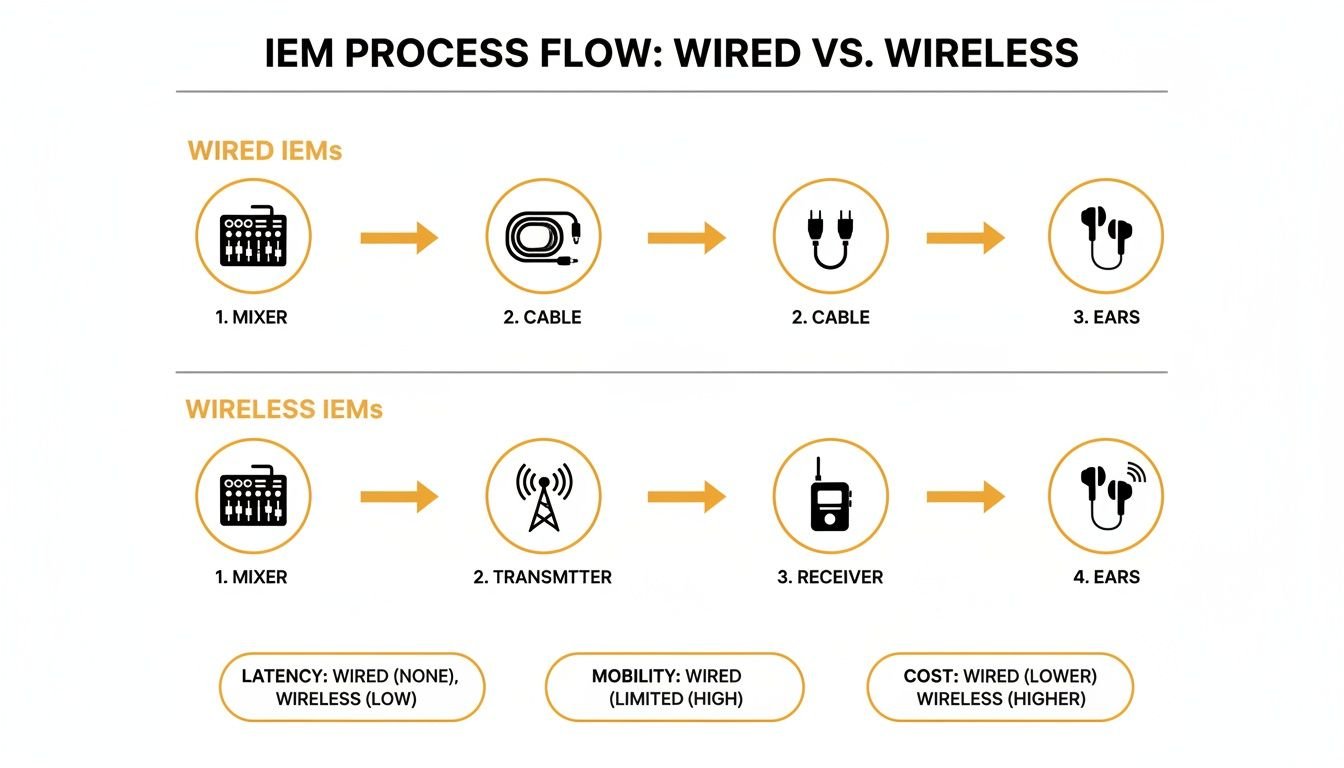
As you can see, a few key pieces of gear—the mixer, transmitter, receiver, and in-ears—have to work together to pull this off.
Step 1: Connect the Transmitter to Your Mixer
First things first, you need to send the monitor mix from your console to the IEM transmitter. This is exactly what the auxiliary (or "aux") outputs on a digital mixer are for.
- Find an Available Aux Output: Look at the back of your mixer. You’ll see a row of jacks labeled "Aux Out," "Mix Output," or "Bus Output." These are usually XLR or 1/4-inch TRS connections.
- Run the Cable: Connect a good-quality XLR or TRS cable from one of those outputs to the corresponding input on the back of your IEM transmitter. If the transmitter has combo jacks, either cable will work just fine.
- Power It Up and Position It: Plug in your transmitter’s power supply and turn it on. Find a good spot for it, preferably with a clear line-of-sight to the stage. Keep it away from big metal objects or other wireless racks that could interfere with the signal.
Step 2: Sync the Receiver and Build a Basic Mix
With the transmitter humming along, it's time to get the performer's bodypack receiver connected and start crafting their personal mix.
Getting the Gear in Sync:
- Pop fresh batteries into the bodypack receiver and power it on.
- Nearly all modern systems have a "sync" function. Just hold the receiver close to the transmitter and press the sync button on both units. They'll automatically find each other and lock onto the same frequency. It usually only takes a few seconds.
Building Their First Mix:
- On your mixer, select the aux bus that you connected in Step 1 (for example, "Aux 1").
- Start by raising the channel for the performer's own voice or instrument. This is the "more me" that every musician asks for, so give it to them first.
- Now, slowly add in the other core elements they need for reference. Think kick drum and bass for rhythm, and a chordal instrument like a piano or acoustic guitar for pitch.
Practical Example: You're setting up a mix for your lead singer on Aux 1. You'd push her vocal fader way up in the Aux 1 mix. Then, you'd carefully bring in just enough kick drum and bass so she can feel the groove, plus a touch of the piano to help her stay on key. That's it. Start simple and build from there.
Step 3: Empower Your Musicians
Here’s one of the best things about modern digital mixers: you can let musicians control their own monitor mixes right from their phones. This is a game-changer that frees you up as the sound engineer and gives performers the exact mix they need to play their best.
Apps like the M32-Q for Midas/Behringer mixers or OneMix for Allen & Heath boards are designed for this. Each musician just connects to the same Wi-Fi network as the mixer, selects their assigned aux bus, and gets a simple screen to raise or lower any channel in their ears.
This is a massive win for everyone involved. At John Soto Music, we constantly see how this simple tech upgrade improves band morale and performance quality literally overnight. It's an investment in your team's confidence.
Pro Tip: Use Stereo for a Wider, Clearer Soundscape
If your ear monitor system is stereo-capable, use it! A mono mix gets the job done, but a stereo mix feels immersive and professional. By panning instruments slightly to the left and right in a performer's ears, you create a sense of space that sounds far more natural and much less cluttered.
For instance, in your vocalist's stereo mix, you could pan the hi-hat a little to one side and the rhythm guitar slightly to the other. This simple trick dramatically improves clarity, letting the performer pick out each instrument distinctly without having to crank up the overall volume. It’s the secret to a clean, professional-sounding IEM mix and a key feature in quality systems you'll find at John Soto Music.
Choosing the Right Ear Monitor System for You
Walking into the world of in-ear monitors can feel like staring at a wall of endless options. With so many models and price points, it's easy to get lost in spec sheets and just pick something that looks good.
But here’s the secret: the best system isn’t about the brand name, it's about what you actually need. What works for a solo artist in a coffee shop is total overkill for a weekend band, and what that band needs won't survive a single night on a professional tour.
Let’s cut through the noise. This guide will help you pinpoint the right gear for your real-world situation. We'll look at the most common scenarios we see every day and highlight the features that truly matter for each, pointing you to reliable solutions you can find right here at John Soto Music.
For the Small Church or Weekend Band
If you’re running sound for a small church, playing in a bar band, or just dipping your toes into the world of IEMs, your biggest concerns are simplicity and cost. You need a system that just works, right out of the box, without needing a dedicated sound engineer to wrestle with frequencies.
This is where budget-friendly bundles shine. These systems are built to be plug-and-play. They often have simple one-button sync features and pre-set frequency groups that make setup a complete breeze.
Practical Example:
A local four-piece band plays different bars every weekend. Their gear needs to be portable, dead simple to set up, and not eat up their entire gig budget.
- Solution: A fantastic starting point is a system like the Sennheiser XSW IEM. It’s respected for being tough and straightforward. The band could buy a single transmitter and four bodypack receivers. This lets them share one stereo mix or even split it into two separate mono mixes, saving a ton of money while getting everyone the clarity they need. This is a smart investment to professionalize their sound.
For the Touring Musician or Production Company
Once you hit the road for real or start managing professional events, the game completely changes. At this level, reliability isn't a nice-to-have feature—it’s everything. Your gear has to be built like a tank to handle being thrown in and out of a trailer, and it needs the RF muscle to cut through the noise in packed arenas.
Professional-grade systems are easy to spot. They have rugged, all-metal construction, powerful tools for managing frequencies, and are designed to scale up for huge casts and bands. You can't compromise on features like detailed frequency scanning, network control for monitoring, and high-end internal components.
Practical Example:
A regional band is touring theaters and outdoor festivals. They have six members on wireless IEMs and can’t afford a single dropout in front of a paying crowd, especially in cities where the airwaves are crowded.
- Solution: This is where a touring-grade system like the Shure PSM 900 becomes the non-negotiable standard. Its incredible RF filtering and automatic frequency coordination are lifesavers in dense environments. The band would absolutely invest in an antenna combiner and a directional paddle antenna to create a rock-solid RF backbone for all six receivers, ensuring a flawless show every night.
For Large Venues and Installations
When you’re outfitting a large church, a theater, or a corporate event space, the main challenge is managing a high number of wireless channels. Once you have ten, twenty, or more wireless mics and IEMs all running at once, you can't just "turn them on and hope for the best." That’s a recipe for an RF nightmare.
This is where networked audio and dedicated antenna distribution become absolutely critical. These systems let an engineer see, monitor, and control every single wireless unit from a computer, guaranteeing every performer gets a clean, uninterrupted signal.
Practical Example:
A large church is overhauling its main sanctuary sound. They need to provide clean, individual monitor mixes for a 10-person worship team, plus several pastors and guest speakers every single week.
- Solution: Instead of setting up a dozen separate transmitters that all fight with each other, the church needs a system built around an antenna distribution unit. This one piece of gear lets multiple transmitters share a single pair of antennas, which dramatically cleans up the RF environment and improves signal stability. Pro systems from Shure or Sennheiser are designed for this, creating a scalable and manageable ear monitor system for the entire team.
Your Buyer's Checklist
Before you add anything to your cart, ask yourself these questions. Your answers will steer you directly to the right gear.
- Budget: What can I realistically invest per user? (Under $400, $400-$1000, or $1000+?)
- Number of Users: How many people need a mix right now? How many will we need a year from now?
- Performers: Are my musicians sitting still (drummers, keys) or are they all over the stage (vocalists, guitarists)? This will tell you if you can use wired packs for some positions.
- Environment: Are we playing in small, controlled rooms or big venues with tons of competing wireless signals from other events or TV stations?
- Existing Gear: What mixer are we using? Does it have enough aux sends for stereo mixes, or does it support personal monitoring apps?
The explosive growth in live events means more and more people are discovering the power of in-ears. The global market is currently valued at USD 413.2 million and is expected to hit USD 595.1 million by 2032. While major players like Shure and Audio-Technica lead the pro world, great options are opening up for smaller groups, and retailers like John Soto Music are here to help you make sense of it all. Discover more insights about the IEM market's growth to see where the industry is headed.
Troubleshooting Common IEM Problems
It's the moment every performer dreads. That sudden, gut-wrenching silence in your ears, a crackle of static right at a key moment, or a mix that just sounds weak and lifeless. When your entire performance depends on your ear monitor system, any little glitch feels like a catastrophe.
But after years of working with bands and worship teams, I can tell you that most IEM issues are surprisingly simple to fix. Before you start thinking your expensive gear is broken, just breathe. The solution is almost always a quick fix you can do in seconds. Let's walk through the top three problems you'll face on stage and how to solve them.
No Sound in My Ears
This is hands-down the most common—and most terrifying—issue, but it’s rarely a serious problem. Don’t panic. Just work your way down this list, starting with the most obvious culprits.
- Check Your Batteries: This is the fix 90% of the time. Are the batteries in your bodypack receiver truly fresh? They might have shown a full charge during soundcheck, but they can drain fast. Always, always start a gig with brand-new or fully charged batteries.
- Is It On and In Sync? It sounds simple, but you'd be surprised. Make sure both your transmitter and your receiver pack are powered on. Look for the sync light—it should be solid. If it’s blinking or off, you’ve lost connection and need to re-sync the units.
- Cable Connections: Is your pack plugged in all the way? Jiggle the connector at your bodypack and at your earphones. A cable that’s been pulled just slightly loose is a classic show-stopper.
Wireless Dropouts or Static
If you’re getting random bursts of static or your sound cuts out completely, you’re dealing with radio frequency (RF) interference. Your wireless system is fighting for air space with every other wireless signal in the room, from other mics to the local news station's broadcast tower.
Practical Example: Your vocalist gets a blast of static every time they walk to the left side of the stage. That's a classic sign of an RF "dead spot" or interference. The answer isn't to tell them where to stand; it's to find a cleaner radio channel for their ear monitor system.
The solution is built right into your gear. Use the "scan" function on your transmitter. This tells the unit to search the airwaves and find the cleanest, most open frequency in your venue. Once it finds a clear channel, just sync your receiver pack to it, and you'll lock in a stable, interference-free signal. This is a must-do before every single show.
Poor Sound Quality or Lack of Bass
Does your mix sound thin, tinny, and completely missing its low-end punch? I can almost guarantee the problem is the seal of your eartips. A good, tight seal is non-negotiable; it’s what provides the acoustic isolation needed for rich bass and full, clear audio.
Without a snug fit, all the low frequencies just leak out, leaving you with a weak, frustrating sound. Take the time to experiment with the different sizes of silicone or foam tips that came with your earphones. You’ll know you have a perfect seal when the outside world gets quiet and the bass in your mix suddenly comes to life. This is the single most important step for getting good sound.
Finally, a little preventative care goes a long way. Regularly clean the wax from your earphones with the little tool they came with and always store your system in its protective case. This simple discipline ensures your gear is ready to go every time you hit the stage. For professional-grade systems built to handle the rigors of live performance, take a look at the options we trust at John Soto Music.
Frequently Asked Questions About Ear Monitors
As you start exploring the world of in-ear monitors, a lot of practical questions are bound to come up. It happens every time. Here are the clear, straightforward answers to the questions we hear most often from performers, worship teams, and sound techs.
Can Our Musicians Share One Monitor Mix?
Technically, you can send one mix to multiple bodypacks, but you’d be missing the entire point of an IEM system. The real power of in-ears is giving every single performer a personalized mix.
Think about it: your singer needs to hear their voice way out front to stay on pitch, but the drummer needs to feel the kick and bass to lock in the groove. A shared mix is a compromise that satisfies no one. For the best sound on stage and the happiest musicians, you should always plan on having one transmitter for each unique monitor mix you need. This is the key to unlocking professional on-stage sound.
Are In-Ear Monitors Safe for My Hearing?
Absolutely. When you use them the right way, they’re actually much safer for your hearing than traditional stage wedges. The magic here is isolation. A good pair of in-ears creates a seal that blocks out most of the ambient stage noise—like blaring amps and crashing cymbals.
This seal allows you to hear your personal mix with perfect clarity at a much lower, safer volume. You’re no longer fighting to hear yourself over the noise. You get total control over your listening level, which is one of the single most important health benefits of making the switch.
The universal-fit earphones that come with most systems are a great starting point. Don't feel like you need to spring for expensive custom molds right away. The most important thing is to try the different foam and silicone tips included in the box to find a size that gives you a snug, comfortable seal. You can always upgrade to custom molds down the road for the ultimate fit and isolation.
Ready to experience crystal-clear stage sound and protect your hearing? An ear monitor system is the most significant upgrade you can make to your live performance. The team at John Soto Music can help you build the perfect wired, wireless, or hybrid ear monitor system for your band or church. Explore our complete IEM solutions and find the right fit for your budget and performance needs. Check out our systems at https://www.johnsotomusic.com.